Navigating the expansive world of Roblox scripting can be a rewarding yet challenging endeavor, especially when striving for optimal game performance and efficiency. This guide delves into the essential techniques and tools for effectively comparing Roblox scripts. Understanding how to analyze and contrast different script versions is crucial for developers and even advanced players looking to refine their game experiences, debug issues, or integrate new features seamlessly. We will explore methods for identifying performance bottlenecks, ensuring code integrity, and choosing the best scripting approaches for various game mechanics. Mastering script comparison empowers you to make informed decisions that enhance gameplay, reduce lag, and create a more polished, enjoyable environment for players across all platforms, including mobile, which continues its dominance in gaming trends. Learn to optimize your creations and troubleshoot like a pro in the ever-evolving Roblox universe, ensuring your efforts translate into smooth, engaging experiences for a global audience.
How can I effectively compare two Roblox scripts to find differences?
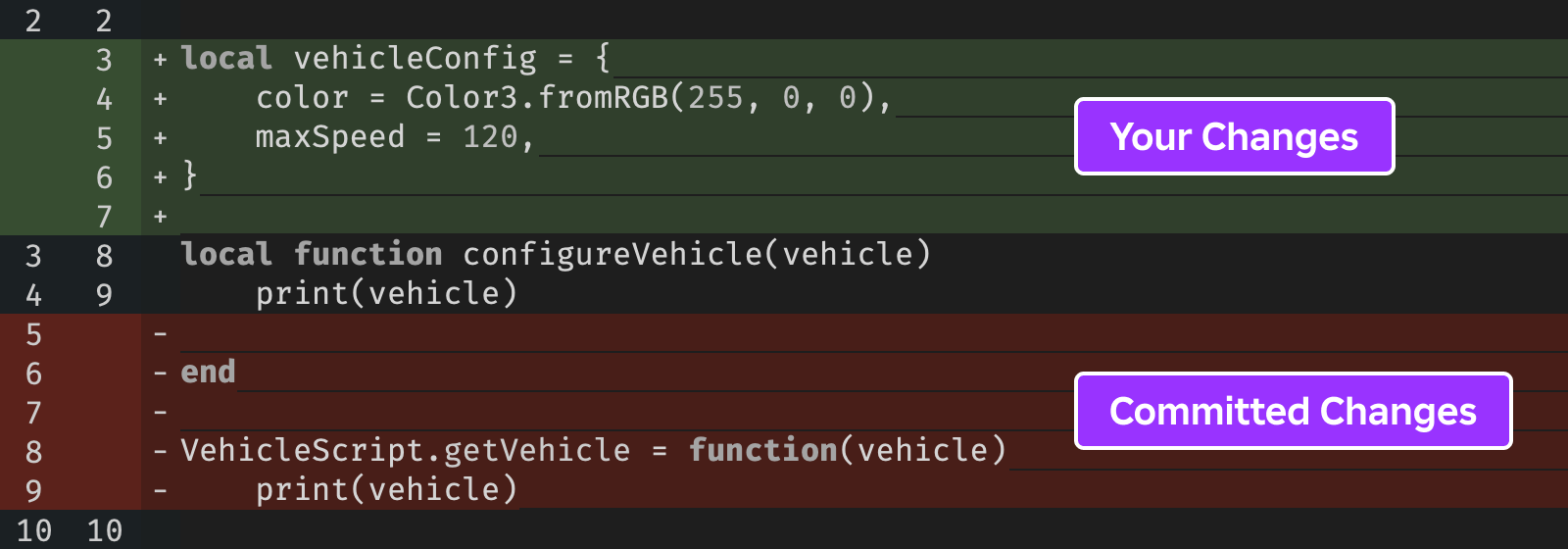
Effectively comparing two Roblox scripts often involves using specialized diff tools outside of Roblox Studio, such as WinMerge, Beyond Compare, or online diff checkers. You would export both script versions as .lua files and feed them into these tools. They provide a visual side-by-side comparison, highlighting added, deleted, or modified lines, which makes identifying changes and potential issues much faster than a manual line-by-line check. For developers using version control like Git, built-in diff commands offer powerful comparison capabilities directly within your development workflow.
What are the key indicators of a performance issue when comparing Roblox scripts?
When comparing Roblox scripts for performance, look for changes in loop structures that might process more data, new or altered event connections that fire too frequently, or the introduction of expensive operations like excessive physics queries (e.g., GetTouchingParts) or object instantiations within tight loops. Pay attention to how often functions are called and whether data is being efficiently managed. Unoptimized server-client communication, such as frequent RemoteEvent calls with large payloads, can also indicate potential lag, especially when scaling up for more players or lower-end devices.
Is it better to optimize a script for the server or client in Roblox?
Generally, it's best to optimize scripts on both the server and client, but with different focuses. Server-side optimization is critical for game logic, physics, and security, as a well-performing server benefits all players consistently. Client-side optimization, primarily through LocalScripts, handles visual effects, UI, and player input, which directly impacts a player's perceived responsiveness and frame rate, especially on mobile. Balancing the workload between client and server, minimizing network traffic, and using efficient algorithms on both ends are key for overall smooth gameplay. For most shared game mechanics, server optimization should be prioritized.
How can a "roblox compare script" process assist in debugging complex game logic?
A "roblox compare script" process is invaluable for debugging complex game logic. When a bug appears, comparing the current buggy script with a known working version can immediately pinpoint recent changes that might have introduced the error. This helps isolate the problem to specific lines of code, preventing hours of searching through large codebases. It’s particularly useful for tracking down unintended side effects or logical flaws introduced during feature updates, allowing developers to revert problematic changes or quickly patch them.
What are the best practices for maintaining multiple versions of a Roblox script for comparison?
The best practice for maintaining multiple versions of a Roblox script for comparison is to use a version control system (VCS) like Git. Export your scripts from Roblox Studio and manage them in a local Git repository. This allows you to create commits for every change, branch for new features, and easily compare any two historical versions using Git's powerful diff tools. Alternatively, for simpler projects, you can manually save dated copies of your script files, but this is less efficient and prone to error compared to a VCS.
When should I consider using a Roblox compare script tool versus manual inspection?
You should consider using a Roblox compare script tool (external diff software) whenever the changes between two script versions are more than a few lines, or if you're trying to understand how a script evolved over several iterations. Manual inspection is fine for very minor, targeted changes, but it becomes error-prone and time-consuming for larger modifications. Diff tools provide a clear, color-coded visual representation of differences, making it significantly faster to identify what has changed, especially for busy developers or gamers balancing life commitments.
Are there any community-made Roblox plugins that help compare scripts directly within Studio?
While Roblox Studio's native capabilities for script comparison are somewhat limited, the robust developer community has created various plugins to enhance the workflow. While direct 'diff' tools integrated into Studio are less common due to the nature of how scripts are saved and loaded, plugins often focus on improving code readability, formatting, or providing linting capabilities that indirectly help in spotting discrepancies or issues. Some plugins might offer versioning snapshots or export functionalities that facilitate comparison with external tools. Always check the Roblox Plugin Marketplace for the latest community-contributed tools that can streamline your scripting and comparison processes within Studio.
Hey fellow gamers! Ever found yourself scratching your head, wondering why your awesome Roblox game is chugging along slower than a snail stuck in cement? Or maybe you’ve downloaded a cool new script, but it just doesn’t feel right, and you suspect it’s clashing with your existing code or isn't as efficient as it could be. You’re not alone. In 2026, with an estimated 87% of US gamers regularly diving into virtual worlds for an average of 10+ hours a week, and mobile gaming continuing its meteoric rise, performance and smooth gameplay are more critical than ever. We're all balancing work, family, and life, so when we finally get a moment to game, we want it to be seamless, fun, and relaxing, not a frustrating debugging session. This guide is all about empowering you to take control of your Roblox game’s performance by showing you exactly how to compare scripts effectively, ensuring your creations run like a dream without breaking the bank or your precious free time. Let’s dive into optimizing your Roblox experience, making every gaming session count.
Why Should I Bother Comparing Roblox Scripts?
Comparing Roblox scripts isn't just for hardcore developers; it's a vital skill for anyone serious about improving their game's quality and stability. Imagine you've got two versions of a character movement script. One feels a bit sluggish, the other is buttery smooth. Without comparing them, you'd be guessing why. Comparison helps you pinpoint the exact lines of code that cause issues, introduce bugs, or create performance bottlenecks. It’s like being a detective for your code, identifying inefficiencies that might be causing lag, especially on mobile devices where resources are tighter. For busy gamers who value their relaxation time, a smooth game means less frustration and more fun, fostering those social connections that are a hallmark of modern gaming trends.
What Are the Common Reasons for Script Performance Issues in Roblox?
Script performance issues in Roblox often stem from a few usual suspects. Firstly, inefficient loops or excessive computations running every frame can hog resources. Think about scripts that constantly scan thousands of parts for collisions or repeatedly calculate complex physics without need. Secondly, frequent network calls or unoptimized data replication between the client and server can introduce significant latency, making your game feel unresponsive. Thirdly, not cleaning up resources, like connecting to events and never disconnecting, can lead to memory leaks over time, slowing everything down. Lastly, large numbers of active parts, especially with complex meshes or physics, that are constantly being manipulated by scripts can heavily impact frame rates. Gamers, especially those on budget hardware or mobile, notice these slowdowns immediately.
How Can I Identify Which Roblox Script is Causing Lag?
Identifying a laggy script requires a systematic approach. Roblox Studio's built-in Developer Console (accessible with F9 during playtesting) is your first line of defense. Look at the 'Memory' and 'Performance' tabs. The 'Script Performance' section is particularly useful, showing you which scripts are consuming the most CPU time. Beyond that, the MicroProfiler (Shift + F6 or F7) offers a deep dive into frame-by-frame execution, visualizing exactly what tasks Roblox is performing and how long they take. You can visually spot spikes caused by specific scripts. For a more direct approach, you can temporarily disable scripts in your game (or comment out sections of code) and re-test to see if the lag disappears, narrowing down the culprit. This methodical process saves time and helps busy gamers get back to playing faster.
What Tools Are Available for Comparing Roblox Scripts?
While Roblox Studio doesn't have a direct 'diff' tool like some professional IDEs, you have several options for comparing scripts. The most straightforward is a **manual side-by-side comparison** using two script editor windows in Roblox Studio. For more advanced comparisons, especially with local files, external text comparison tools are invaluable. Popular options include:
- **WinMerge / Beyond Compare (Windows):** These offer robust visual diffing, showing added, deleted, and modified lines clearly.
- **Meld (Linux/Windows):** A free and open-source option with great three-way merging capabilities.
- **Diff Checker / Online Diff Tools:** For quick comparisons without installing software, you can paste script contents into online tools.
- **Version Control Systems (like Git):** If you're managing your Roblox project files locally using a system like Git (which many professional and serious hobbyist developers do), Git's diff capabilities are incredibly powerful for tracking changes between commits and branches.
These tools highlight the differences visually, making it much easier to spot changes in logic or variable names between two script versions.
Can I Use Version Control Systems to Compare Roblox Scripts?
Absolutely, and you should! Using a Version Control System (VCS) like Git is a game-changer for serious Roblox development. Instead of manually saving different versions of your place file, you export your scripts (and other assets) into local files and manage them with Git. Git allows you to:
- **Track Every Change:** See who changed what, when, and why.
- **Revert Changes:** Easily roll back to previous, working versions of your script.
- **Branching:** Experiment with new features in isolated branches without affecting your main game.
- **Collaborate:** Work with others on the same project, merging their changes seamlessly.
- **Compare Revisions:** Git's command-line tools or integrated GUI clients (like GitHub Desktop, Sourcetree) provide powerful diffing capabilities, showing exact line-by-line differences between any two versions of a script in your repository.
This approach provides a professional workflow, which is becoming increasingly important as games become more complex and social interaction during development increases. It aligns with the trend of skill-building and optimizing performance not just in-game, but in the development process itself.
What Specific Script Elements Should I Focus On When Comparing for Performance?
When you're comparing scripts with performance in mind, look for several key elements:
- **Loop Structures:** Are loops iterating over unnecessarily large datasets? Can `ipairs` be used instead of `pairs` for arrays? Are there infinite loops?
- **Event Connections:** Are you connecting to events (`.Connect`) inside loops? Are connections being properly disconnected (`:Disconnect()`) when no longer needed to prevent memory leaks?
- **Expensive Operations:** Frequent `GetService` calls, physics calculations (`BasePart:GetTouchingParts()`), raycasting, or creating/destroying objects repeatedly within a loop can be costly.
- **Data Structures:** Is an array being used where a dictionary would be faster for lookups, or vice-versa?
- **Global vs. Local Variables:** Using local variables is generally faster as they reduce lookup time.
- **Wait() vs. task.wait():** `task.wait()` is generally preferred for its efficiency and accuracy.
- **Server-Client Communication:** Are you sending too much data or too many remote calls between the server and client? Can you batch updates?
Spotting these differences can often reveal major performance gains, allowing you to enjoy more fluid gameplay, a key value for today's busy gamers.
How Can I Ensure My Optimized Scripts Don't Introduce New Bugs?
Optimizing scripts is a delicate balance. The best way to prevent new bugs is through rigorous testing. Here's a quick checklist:
- **Small, Incremental Changes:** Don't rewrite an entire script at once. Optimize one small section, then test.
- **Unit Testing (if applicable):** For complex functions, create small test cases to ensure they still return expected results.
- **Playtesting:** Thoroughly test the game area affected by the script changes. Play on different devices (PC, mobile) to catch platform-specific issues.
- **Boundary Cases:** Test what happens at the extremes – what if a player has zero health, or there are 100 items in their inventory?
- **Peer Review:** If you're working with others, have them review your changes. A fresh pair of eyes often spots overlooked issues.
- **Revert Capability:** Always have a backup or use version control so you can quickly revert if an optimization breaks something critical.
Remember, a functional but slightly less optimized script is better than a lightning-fast one that constantly crashes or has glitches, especially when player experience and social interaction are paramount.
Are There Any Roblox-Specific Scripting Best Practices for Performance?
Absolutely! Beyond general programming principles, Roblox has its own nuances. Always aim for server-side optimization where possible, as the server typically has more consistent resources than individual client devices, especially mobile. Prioritize local scripts for purely visual or UI elements to reduce server load and network traffic. Use `task.spawn` and `task.defer` for non-critical, potentially long-running tasks to prevent blocking the main thread. Leverage `CollectionService` for tagging objects instead of iterating through the entire workspace. Cache frequently accessed services and instances. Finally, avoid relying on `wait()` for precise timing; `RunService` events like `Heartbeat` are more accurate for continuous updates. These practices ensure a better experience for the average gamer, who simply wants to relax and enjoy the game after a long day.
Conclusion
Mastering the art of comparing Roblox scripts is a powerful skill that transforms you from a casual creator into an efficiency guru. By understanding how to identify performance bottlenecks, utilize comparison tools, and implement best practices, you ensure your games offer a smooth, enjoyable experience for everyone, whether they're unwinding after work or connecting with friends online. This dedication to optimization not only boosts your game's appeal but also saves you valuable time and frustration in the long run. Keep these strategies in your toolkit, and your Roblox creations will stand out for their polish and performance.
What's your biggest challenge in optimizing your Roblox games? Comment below!
FAQ Section
What is a Roblox compare script?
A Roblox compare script typically refers to the process or tools used to analyze differences between two versions of Lua code within the Roblox environment. This could involve comparing script files locally using external diff tools or analyzing changes within Roblox Studio to identify alterations, additions, or deletions that might impact game functionality or performance.
How do I compare two script files in Roblox Studio?
Directly in Roblox Studio, you can open two script windows side-by-side for a manual visual comparison. For more advanced or automated comparisons, especially if your scripts are saved locally, you'd export them as `.lua` files and use external diff software like WinMerge, Meld, or a version control system's comparison features (e.g., Git diff).
Is script comparison important for game performance?
Yes, script comparison is critically important for game performance. By comparing different script versions, developers can pinpoint inefficient code, identify unintended performance regressions introduced by changes, and ensure that optimizations have the desired effect without introducing new bottlenecks. This is crucial for maintaining smooth gameplay, especially for the large number of gamers on mobile devices.
Can comparing scripts help with debugging?
Absolutely. Comparing scripts is a fundamental debugging technique. If a bug appears after a specific change, comparing the current faulty script with a previous working version can quickly highlight the exact lines of code responsible for the new issue. This saves significant time and effort in troubleshooting, getting you back to gaming faster.
What are the benefits of using version control for Roblox scripts?
Using version control (like Git) for Roblox scripts offers numerous benefits including tracking every change, easily reverting to previous stable versions, collaborating effectively with other developers, and providing robust tools for comparing specific revisions of your code. It's essential for managing complex projects and maintaining code integrity over time, making development more organized and less prone to errors.
.Roblox script comparison, performance optimization, debugging scripts, code integrity, scripting best practices, identifying bottlenecks, mobile gaming optimization, efficient development, game experience enhancement, preventing lag, modern Roblox scripting tools, developer productivity, code management, version control in scripting.
35


The Best AI For Roblox Scripting In 2026 Honest Comparison BloxSmith 93711127 Ddc1 4f97 B5db. Contoh Roblox Scripts 2026 Panduan Lengkap Untuk Pemula Jurnal Ngawi 3789630207 . Best AI For Making Roblox Games 2026 Comparison Guide Obby Best Ai For Making Roblox Games Hero.webp. Roblox Executor Comparison 2026 AuroraHub Logo . Roblox AI Script Generator Auto Generate Luau Code In 2026 Obby Roblox Ai Script Generator Mid.webp


What Does Roblox Use For Scripting T M Hi U B Quy T Th Nh C Ng Learn Roblox Scripting Web Copy . Diffy Compare Diff Scripts Community Resources Developer Forum . Roblox Rivals GitHub . 2026 Chat Replica Creations Feedback Developer Forum Roblox 2 690x366 . Best AI For Roblox Scripting In 2026 Top Tools Ranked Obby Obby Best Ai For Roblox Scripting Mid.webp





Roblox AI Script Generator Auto Generate Luau Code In 2026 Obby Roblox Ai Script Generator Hero.webp. How Would I Be Able To Compare Vectors Scripting Support Developer . Best AI For Roblox Scripting In 2026 Top Tools Ranked Obby Obby Best Ai For Roblox Scripting Hero.webp. How To Message On Roblox 2026 A Quick Guide . Best AI Roblox Scripting Assistant For Beginners 2026 1024x572


Roblox Creator Hub Drafts Diff Result . Lumen External Free Roblox Script Executor 2026. Lumen External Free Roblox Script Executor 2026. Lumen External Free Roblox Script Executor 2026. Lumen External Free Roblox Script Executor 2026
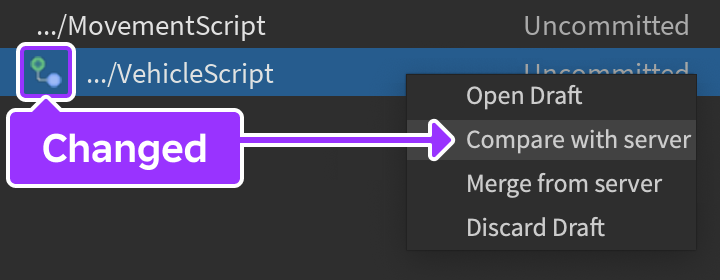

Roblox Scripts Tower Battles Script Lua At Master Retpirato Roblox Roblox Scripts. Best AI For Roblox Scripting In 2026 Top Tools Ranked Obby Obby Blog. The Drafts Window With The Green Plus Icon Highlighted To The Left Of A Drafts Compare . UEFN Vs Roblox Studio Complete Game Development Tool Comparison 2026 Opengraph Image. Roblox Studio AI Best AI Assistants For Roblox Studio In 2026 Obby Roblox Studio Ai Hero.webp
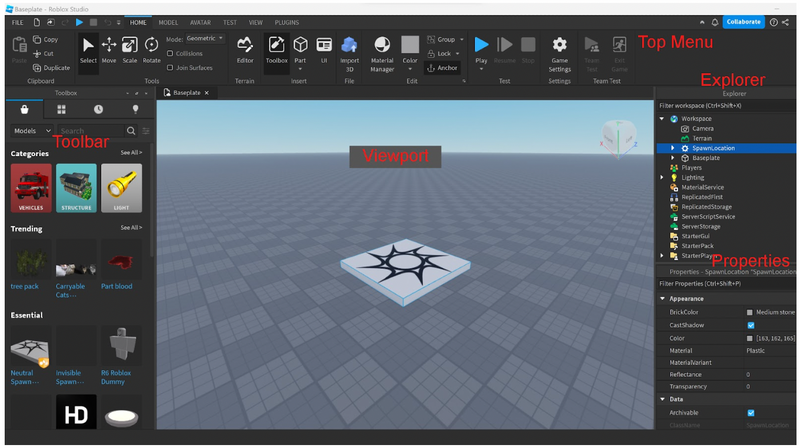



How To Create Roblox Games 2026 Guide Image 095b439e Fc20 47a0 87dc . Blox Fruits Pastebin Script 2026 Loadstrings No Key HDG 1024x570 . Roblox Vs Minecraft Which One Is Better 2026 Roblox Vs Minecraft Hero . How To Use Require Script In Roblox Mobile PC YouTube Hqdefault . Script Roblox Wiki Fandom Latest

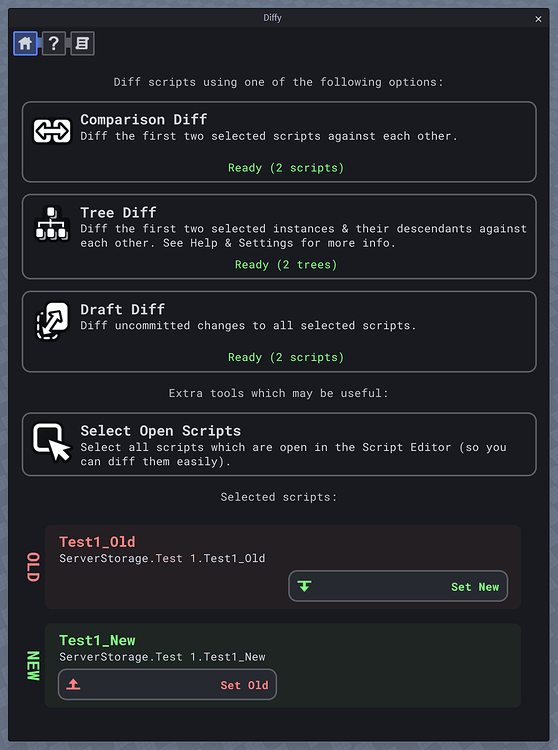



Rolling Script Roblox At Catherine Fletcher Blog . Diffy Compare Diff Scripts Community Resources Developer Forum 2 558x750 . 7 Easy Roblox Studio For Beginners 2026 . BEST OPEN SOURCE ROBLOX EXECUTORS 2026 Technical Analysis Roblox Script. What Is Roblox Terumi Script And Its Role In Gaming Como Usar Scripts En Roblox Studio